


Start Slideshow




 Chevy Volt Test Drive Front View<a title="Inhabitat: Transportation Editor Laura K. Cowan" href="http://inhabitat.com/author/lauracowan" target="_blank">Inhabitat</a> recently had the opportunity to test the latest iteration of <a title="GM" href="http://www.gm.com" target="_blank">GM's</a> Chevy Volt for an entire week, and now we're thrilled to give you a peek into our extended test drive! Now we can tell you what it's really like to live with a <a title="Inhabitat: Inhabitat test drives the Chevy Volt" href="http://inhabitat.com/video-inhabitat-test-drives-the-chevy-volt/" target="_blank">Chevy Volt</a> for a week, and in the country, no less. Can the Chevy Volt live up to expectations when driven 50 miles a day--the max range expected from its <a title="Inhabitat: battery pack" href="http://inhabitat.com/index.php?s=battery+pack" target="_blank">battery pack</a>? How long does it take to charge, really? And are there any quirks that might keep you from wanting to buy one? Read on and check out our gallery for all the details on what it's really like to own a Chevy Volt range-extended <a title="Inhabitat: electric vehicle" href="http://inhabitat.com/index.php?s=electric+vehicle" target="_blank">EV</a>.1
 Chevy Volt Test Drive Rear ViewThe back of the Volt is a long hatch with split rear window a la Prius, but we think the design of this EV is both more attractive and more practical. Visibility is incredible inside, and the long hatch door over the trunk makes for easily accessible storage space.2
 Chevy Volt Test Drive Side ViewNot many details are different on the 2012 Volt than on the previous edition, as GM is still just ramping up their manufacturing of the car. A new cobalt blue exterior color and white interior trim are offered, plus a few extras here and there.3
 Chevy Volt Test Drive Front Three Quarter ViewThe Volt's grille is closed for optimal aerodynamic efficiency. The hood and roof are also subtly curved to reduce air resistance.4
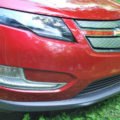 Chevy Volt Test Drive Air SplitterThe Volt has a low air splitter, as well as a rubber flap under the front bumper to further reduce drag. We wouldn't recommend driving this vehicle through snow.5
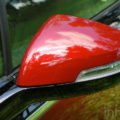 Chevy Volt Test Drive Side MirrorEven the sideview mirrors have been pulled back like putty to reduce drag. The lack of wind noise inside the cabin is noticeable and pleasant, evoking the quiet ride of a much more expensive car.6
 Chevy Volt Test Drive PlugPop the cap on the front left panel of the Volt to charge your car. Pop the cap on the back right to fill its tiny 8-gallon tank with gas. A charge using a standard outlet takes 9 hours and lasted us about 37 miles on average. Even without recharging the vehicle one night and running on the gas generator for 24 hours, we still only used 4 gallons of gas driving this Volt around the countryside beyond its normal range for a full week.7
 Chevy Volt Test Drive Plugged InIf you have a 240-volt quick charger, you can cut your charge time in half to 4 hours. Only problem is, the gas engine generator can turn on at any time during your charge, so you have to charge the Volt in a ventilated area--i.e. not your garage. So much for babying the battery so it has maximum range.8
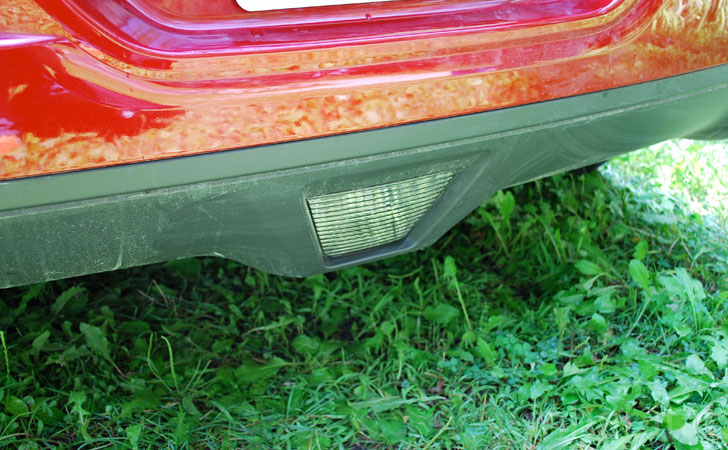
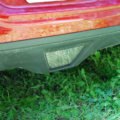 Chevy Volt Test Drive LightThe Volt has a unique light at the back that shoots a V of bright light onto the ground when you unlock the vehicle at night. We found this feature extremely helpful when we were trying to plug in the Volt for charging in the pitch-black country night.9
 Chevy Volt Test Drive ChargerThe Volt comes with a charging cord under the back trunk floor (as well as a tire inflation system instead of a spare). Plug this in to a standard grounded outlet, press a button, and plug it into the car. That's it. The cord is only 20 feet, though, so you'll need a plug on the outside of your house, relatively close to your driveway. We had to pull our tester onto the front lawn to charge it every night.10
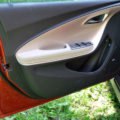 Chevy Volt Test Drive DoorThe Volt has two buttons hidden under the driver's door armrest: gas cap and electric charger cap. You can also pop the cap on the charger or remote start the EV function of the car from your key fob.11
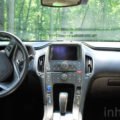 Chevy Volt Test Drive DashboardWe love how the Volt has the new Chevy high-quality interior, but with all its own bits for the radio, navigation, and HVAC controls. The whole center stack is one flat plastic panel of touch buttons.12
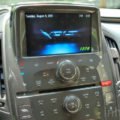 Chevy Volt Test Drive HVACThere are too many buttons on the panel underneath the nav screen, but once you know where they are they are easy to use. We can't figure out why pushing the Eco leaf button to monitor power flow through the car's battery and generator systems automatically turns on the radio, however, as there is no audio component to this sytem.13
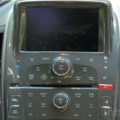 Chevy Volt Test Drive Radio HVACBecause the Volt was created by an experienced automaker, the stereo is of high quality, the navigation system is decent, and the interfaces for all the systems are at least acceptable. We did find that previewing our route on the navigation system was too difficult here, though, and used an iPhone with Google Maps instead.14
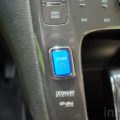 Chevy Volt Test Drive Power ButtonAs soon as you open the door to the Volt, animations of green leaves combine with new agey music to welcome you to the future. Push the pulsing blue power button on the console and the car starts up with a spaceship-like noise we enjoyed every time we got in the vehicle. The engine doesn't engage unless it is needed to repower the battery pack, so start-up and take-off are totally silent.15
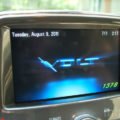 Chevy Volt Test Drive Nav Screen 1This is the standard screen the Volt settles into after turning on.16
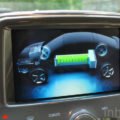 Chevy Volt Test Drive Nav Screen 2Press the Eco leaf button on the console, and an animation pops up to show you how power is flowing to or from the battery and engine generator systems. Modes are labeled Battery Power, Generator, or Regeneration for regenerative coasting and braking.17
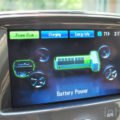 Chevy Volt Test Drive Nav Screen 3You can also monitor your average fuel economy, trip length, and other details by toggling through the three screens available under the Eco leaf button menu. You can also set the vehicle to charge when plugged in or to delay charging for a set time, for instance the middle of the night when electricity may be cheaper.18
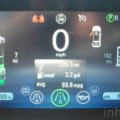 Chevy Volt Test Drive Display 1Through the steering wheel, this is your view, with estimates of total battery and gas tank range, plus trip meters and other calculators to help you on your way.19
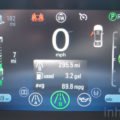 Chevy Volt Test Drive Display 2The Volt's display screen can also be configured to help you drive efficiently. The green ball on the right will shrink and turn yellow if you hit the gas or brake too hard.20
 Chevy Volt Test Drive Rear WindowOur toddler complained of hot sun on her arms under the extended rear hatch window, despite the tapered built-in sun canopy at the top. But there's no doubt that visibility is fantastic back there, as well as cargo space.21
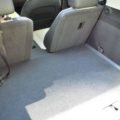 Chevy Volt Test Drive TrunkThe Volt won't fit construction supplies or golf clubs, but it's perfect for holding tons of groceries or even for having a picnic or changing a baby's clothes. The height of the trunk floor is as useful as the rear hatch's size.22
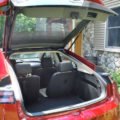 Chevy Volt Test Drive HatchThe hatch is a unique design feature of the Volt, but because most of the car now looks like an average Chevy instead of the futuristic Volt concept we saw at the NAIAS show in Detroit several years ago, we were only noticed by people who were researching the car for purchase.23
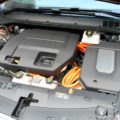 Chevy Volt Test Drive HoodUnder the hood is an inline-4 gas engine and a battery backup, but the engine only serves as a generator when the electric range expires. The engine never drives the wheels as it would in a hybrid.24
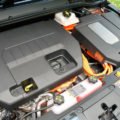 Chevy Volt Test Drive BatteryThe battery pack extends from the front of the car through the center console, and splits under the rear seats to form a T shape. We expect future Volts to have a bench rear seat when battery packs no longer need to be this large.25

























